


Most directors treat their Search Console as a dusty digital filing cabinet, but in 2026, it’s the most powerful weapon in your arsenal for dominating the search results. You’ve likely felt the headache of staring at a google webmaster tools site dashboard, drowning in technical jargon and “fiddly bits” that don’t seem to move the needle on your revenue. It’s frustrating to see data overload without a clear path to action, especially whilst your competitors are snapping up the clicks you deserve.
I’ve been in this game since 2007, and I can tell you that the secret isn’t just fixing errors; it’s about strategic clarity. Find, Convince, Convert. This guide promises to show you exactly how to transform raw search data into a high-conversion SEO strategy using the platform formerly known as Google Webmaster Tools. We’ll strip away the complexity to focus on AI-driven insights and branded query filters that ensure your website is technically sound, highly visible, and built to convert.
Key Takeaways
- Stop treating Search Console as a technical chore and start using it as a strategic command centre to build genuine search authority.
- Navigate the verification process for your google webmaster tools site to ensure you are collecting the comprehensive data needed for a winning SEO Strategy.
- Decode the “Find and Convince” stages of your marketing by analysing the relationship between impressions and click-through rates.
- Secure your technical foundations by monitoring index coverage and crawler behaviour to prevent site errors from stalling your conversions.
- Transform overwhelming data into an actionable Digital Road Map that prioritises high-impact results over minor technical distractions.
From Webmaster Tools to Search Console: The Strategic Evolution
Many directors still refer to their setup as a google webmaster tools site, and that is perfectly understandable. Whilst the official rebrand to Google Search Console took place in May 2015, the original name persists amongst seasoned professionals who have been in the game since the early days of search. Understanding Google Search Console’s evolution is less about the name change and more about a fundamental shift in philosophy. It has moved from being a technical diagnostic checklist into a strategic command centre for business authority.
To better understand this concept, watch this helpful video:
Defining the Modern Search Console
Search Console is the definitive source of truth for your organic performance, providing direct feedback from the only source that truly matters. Every UK business director needs direct access to this data. You shouldn’t leave it solely to developers or transient employees. There is a massive difference between “site health,” which is a technical baseline, and “market dominance,” which is a strategic outcome. One keeps the lights on; the other leaves your competition behind.
Why Google Analytics Isn’t Enough
Don’t confuse your tools. Analytics tracks what happens once a user is on your site, but Search Console tracks how they find you. It reveals the specific queries that lead people to your door, filling the gaps left by the “not provided” data seen in other platforms. To build a truly assertive SEO Strategy, you must integrate both. One tells you about user behaviour; the other tells you about Google’s perception of your authority. Without Search Console, you are effectively flying blind in the pre-click phase of the customer journey.
How to Connect Your Site and Verify Ownership
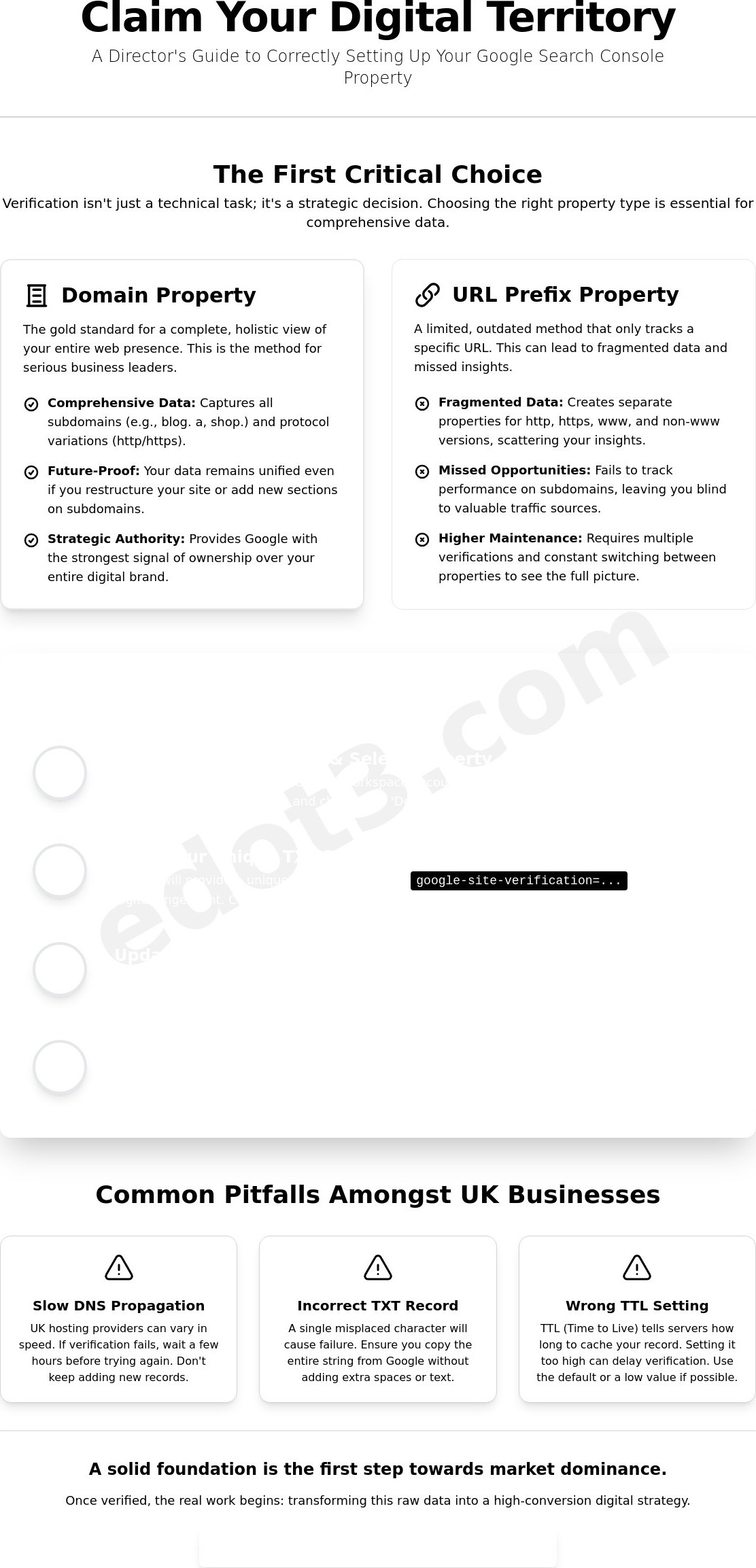
Connecting your google webmaster tools site is the first real step toward taking control of your search presence. It is not just a technical formality; it is about claiming your digital territory and ensuring Google knows exactly who is in charge. Many businesses take the easy route with URL prefix verification, but for a serious director, that is a mistake. Setting up your google webmaster tools site correctly from day one prevents data fragmentation and ensures you aren’t missing vital performance metrics.
The choice between “Domain” and “URL Prefix” is where most people stumble. Domain verification is the gold standard because it tracks your entire site, including subdomains and both secure and non-secure versions of your URLs. It provides a holistic view of your data that the URL prefix method simply cannot match. If you are following the official Google Search Console guide, you will see that whilst multiple methods exist, DNS verification is the most robust way to prove your authority and secure your data for the long term.
The Verification Process Step-by-Step
Verification begins by accessing the interface with a professional Google account. Avoid using personal Gmail addresses; use a workspace account tied to your business to maintain professional standards. Once you enter your domain, Google will provide a TXT record. You must add this to your DNS settings via your hosting provider. Amongst UK providers like Ionos, 123 Reg, or SiteGround, the interface varies, but the principle remains the same. You are telling the world that you own this asset. Common pitfalls amongst UK hosting providers often involve slow DNS propagation or incorrect TXT record formatting. If you don’t set your TTL (Time to Live) correctly, you might be waiting days for verification to trigger. Once the record is saved, click verify. The initial data crawl usually takes 24 to 72 hours to populate. Don’t expect instant miracles; good data takes time to aggregate.
Managing Permissions Like a Director
Ownership is power. You should always be the primary “Owner” of your property. I have seen too many instances where a business loses access because a transient employee or a former agency held the keys and then disappeared. It is a nightmare you don’t need. Instead, grant “Full User” or “Restricted User” status to your team members. This keeps them accountable whilst ensuring you maintain ultimate control over your search data. Organise your team by regular audits of who has access. If you are struggling to get your technical foundations in place, it might be time for a digital health check to see where your setup is leaking value.
Interpreting Performance Data to Find and Convince
Data is only useful if it leads directly to revenue. In your google webmaster tools site dashboard, the Performance report is where we separate the vanity metrics from the genuine business opportunities. We view the relationship between Clicks and Impressions as the ‘Find’ stage of your digital roadmap. High impressions indicate that you are visible; Google has determined your content is relevant enough to appear in the search results. However, if those impressions aren’t turning into clicks, you are failing to ‘Convince’ the searcher. This is where your Click-Through Rate (CTR) becomes the most important metric in the room.
Whilst Google’s official guide to Search Console provides the basics of navigating these charts, a director-level approach requires looking for ‘Quick Wins’. These are keywords currently ranking on page two, typically positions 11 to 20. By identifying these queries, you can focus your content creation efforts on pushing these terms onto page one, where the real traffic lives. Similarly, the ‘Pages’ report allows you to see which specific URLs are driving value, helping you prioritise your high-conversion assets over the ‘fiddly bits’ that don’t contribute to the bottom line.
The Query Report: What Your Audience Actually Wants
Filtering your query data allows you to understand the specific intent behind a search. You will often find ‘hidden’ queries you didn’t even realise you were ranking for, which can spark ideas for new, high-impact content. It is also the best place to spot technical issues that dilute your authority. Keyword cannibalisation occurs when multiple pages on your google webmaster tools site compete for the same query, causing Google to split your ranking power and weaken your overall search presence.
Optimising for Higher CTR
Winning the click is about more than just a high ranking; it is about believable branding. Use your performance data to identify pages with high impressions but low CTR, then rewrite your meta titles and descriptions to be more assertive and persuasive. You must also compare your performance across mobile and desktop devices. In 2026, a seamless mobile experience is non-negotiable, and any significant drop in mobile CTR usually points to a technical or design flaw that is sabotaging your ability to convince your audience.
Technical Health: Ensuring the Crawler Can Convert
Technical health is the bedrock of your search presence. If your google webmaster tools site is riddled with errors, you are essentially building on sand. It doesn’t matter how great your content is if Google’s spiders can’t reach it. Understanding what a crawler means for your business is the difference between consistent growth and total stagnation. These bots are the gatekeepers of your visibility. If they encounter roadblocks, your rankings will plummet and your ROI will vanish. You need exceptional foundations to ensure your site is findable, indexable, and ready to convert.
Submitting an XML sitemap is your way of handing Google a clear map of your territory. It organises your site architecture and ensures the bots don’t get lost in the weeds of your subfolders. Without a clean sitemap, you are leaving your most valuable pages to chance. In the 2026 search landscape, where AI-driven search prioritises technical precision, a messy site structure is a liability you cannot afford. You must ensure that your best content is front and centre for both the user and the algorithm. Of course, technical excellence alone won’t build your authority; you also need a robust strategy for earning SEO backlinks that signal genuine trust to Google.
Fixing Indexing Errors
The Index Coverage report is where you see the cold, hard truth about your site’s visibility. You will often see pages marked as ‘Excluded’. Don’t panic; not every exclusion is an error. Some are intentional, such as administrative pages or duplicate tags. However, you must decide which ones are actually hurting your performance. Wasteful crawl budget spent on low-value fiddly bits is a silent killer of SEO success. Use the URL Inspection tool to request immediate re-indexing when you’ve made significant updates. Whilst it can take 24 to 72 hours for data to populate, this tool forces Google to acknowledge your improvements sooner rather than later.
Mobile Usability and Speed
In 2026, mobile-first indexing is the absolute standard. Google primarily reports on the mobile version of your website, making mobile usability non-negotiable for business growth. Your Core Web Vitals report provides a real-world look at how users experience your site. This isn’t just about raw speed; it’s about visual stability and responsiveness. Technical Search Engine Optimisation directly feeds into the ‘Convert’ stage of the user journey. If a page takes three seconds too long to load on a smartphone, you’ve lost the lead. It is that simple. A technically sound site is a high-conversion site that leaves the competition behind.
If your technical reports are showing more red than green, you are losing money every minute. Stop guessing and get a professional Technical Search Engine Optimisation audit to clear the path for your customers.
Building a Digital Roadmap with EDOT3
Setting up your google webmaster tools site is only the first step. The real challenge lies in turning that raw data into a dominant market position. At EDOT3, we don’t just look at graphs; we build an assertive SEO Strategy that focuses on the metrics that actually impact your bottom line. We use the insights gathered from your performance reports to fuel our ‘Find, Convince, Convert’ philosophy. It is about moving beyond the technical noise to find the high-value opportunities your competitors have missed.
Interpretation is where most businesses fail. They see the numbers but lack the roadmap to act on them. We bridge that gap by moving beyond basic diagnostics into AI Search Optimisation and PR-SEO. This holistic approach ensures your google webmaster tools site isn’t just a collection of data points, but the foundation of a believable, loveable brand that commands authority in the search results. A critical part of that authority comes from building high-quality SEO backlinks that drive genuine business growth rather than the low-quality links that trigger Google penalties.
Why Seniority Matters in SEO
I have been in the game since 2007. In that time, I’ve seen countless “experts” come and go, often leaving clients with messy setups and zero results. The EDOT3 difference is simple: you work directly with a Director. You won’t be passed off to a transient employee who might disappear next month. We take personal accountability for your ROI. We turn sterile data into exceptional foundations, ensuring your brand isn’t just findable, but truly convincing to your target audience.
Your Next Steps for Dominance
Success in 2026 requires more than just fixing “fiddly bits”. It requires a cohesive engine where branding, web design, and technical SEO work in perfect harmony. Your journey toward search dominance begins with a Digital Health Check. This is where we strip back the layers of your current presence to see exactly where you are losing ground. Whether you want to meet at our Newcastle or London offices, we are ready to help you stop guessing and start growing. It’s time to build a digital roadmap that delivers high-end results without the corporate coldness. Contact us today to get started.
Take Control of Your Search Authority
Stop letting your search data sit idle. We have explored how your google webmaster tools site evolved from a simple diagnostic panel into a powerful strategic engine for 2026. You now know that verifying your domain correctly and interpreting CTR is the only way to truly find and convince your target market. Technical health isn’t a “fiddly bit”; it is the essential foundation that ensures the crawler can actually lead to a conversion.
Since 2007, I’ve seen too many directors lose ROI because they lacked a clear digital roadmap. We combine director-level seniority with our proven “Find, Convince, Convert” methodology to turn complex AI search and technical SEO data into market dominance. You deserve a partner who values accountability over superficial aesthetics. Don’t leave your growth to chance or transient employees who might disappear when things get complex.
It’s time to stop guessing and start winning. Get Optimised For Success with a Digital Health Check and let’s build your path to the top of the search results together.
Frequently Asked Questions
Is Google Webmaster Tools the same as Google Search Console?
Yes, it is the same platform. Google rebranded the tool on 20 May 2015 to reflect that it isn’t just for “webmasters” anymore, but also for marketers, SEO experts, and business owners. Whilst the name changed over a decade ago, many professionals still search for a google webmaster tools site when they want to access their performance data.
How much does it cost to use Google Webmaster Tools?
Google Search Console is a completely free service. There are no subscription fees, tiered pricing, or hidden costs to access your data or receive technical alerts. It is arguably the most valuable free asset in your marketing stack, providing direct insights from Google’s own index without requiring a penny of investment.
Can I use Search Console without a website?
No, you must have a live website to use the service. Verification requires you to prove ownership of a domain or a specific URL prefix through your DNS settings or server files. If you don’t have a site to crawl, there is no data for Google to report on or analyse.
How often should I check my Search Console data?
You should review your performance reports at least once a month, but a weekly check is better for active growth phases. Google will automatically email you if it detects critical indexing errors or security threats. Don’t get bogged down in daily fluctuations; focus on the broad trends in your digital roadmap to identify genuine opportunities.
Will Search Console help my site rank higher immediately?
Search Console is a diagnostic and strategic tool, not a ranking “switch.” It doesn’t give you an immediate boost just by signing up. Instead, it provides the data you need to fix technical errors and optimise your content. You must act on these insights to build the authority that leads to higher rankings.
What happens if I don’t verify my site in Search Console?
You are essentially flying blind. Without verification, you won’t receive alerts about manual penalties, mobile usability issues, or indexing failures that could kill your traffic. You also lose access to the specific query data that tells you exactly what people are searching for before they land on your google webmaster tools site.
How do I add a sitemap to my Google Webmaster Tools site?
Navigate to the ‘Sitemaps’ report in the left-hand navigation menu and enter the URL of your XML sitemap. This is typically located at yourdomain.com/sitemap.xml. Submitting this helps Google’s crawler find and index your pages more efficiently, ensuring your site architecture is clear and your best content is findable.
Can Search Console track my competitors’ websites?
No, you can only track websites where you can prove ownership. Because the verification process requires access to the site’s DNS records or server, you cannot peek into a competitor’s private performance data. You would need to use third-party SEO tools for competitor analysis, as Search Console is strictly for your own verified assets.